Automation has become one of the most important tools for businesses, entrepreneurs, marketers, and content creators. Whether you’re managing customer relationships, automating email campaigns, syncing data between applications, or streamlining repetitive tasks, automation platforms can save countless hours every week.
Among the many automation tools available today, two platforms consistently dominate the conversation: Zapier and Make.
Both tools help users connect applications and automate workflows without extensive coding knowledge. However, they take very different approaches to automation, pricing, customization, and usability.
If you’re wondering which platform is best for your needs, this comprehensive Zapier vs Make comparison will help you understand the strengths, weaknesses, and ideal use cases for each solution.
What Is Zapier?
Zapier is one of the most popular no-code automation platforms in the world. Founded in 2011, it allows users to connect thousands of applications and automate tasks through workflows called “Zaps.”
A Zapier typically consists of:
- A trigger
- One or more actions
- Optional filters and conditions
For example:
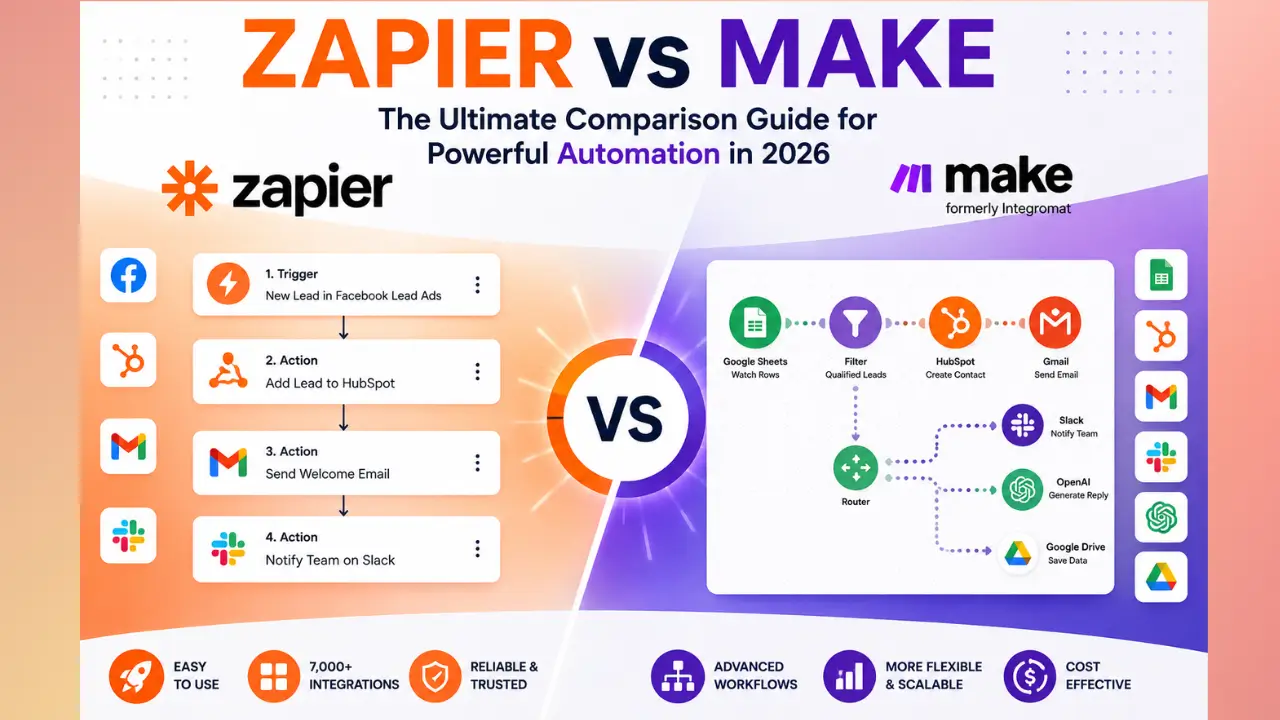
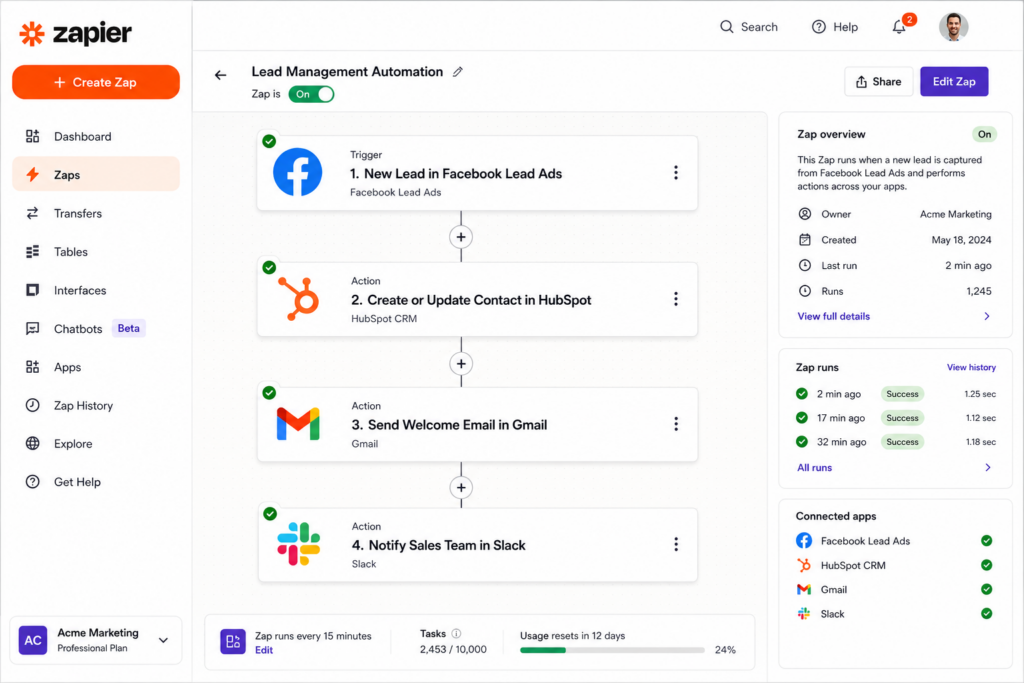
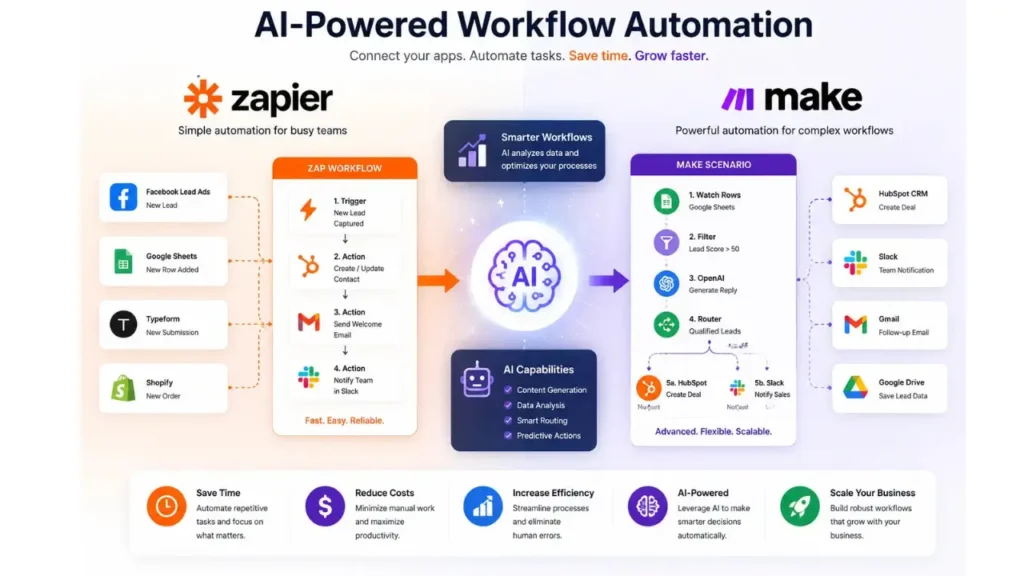
Trigger: New lead arrives in Facebook Lead Ads
Action 1: Add lead to CRM
Action 2: Send welcome email
Action 3: Notify sales team in Slack
Zapier is known for its simplicity, making it a favorite among beginners and small businesses.
What Is Make?
Make, formerly known as Integromat, is an advanced visual automation platform that allows users to create highly customizable workflows.
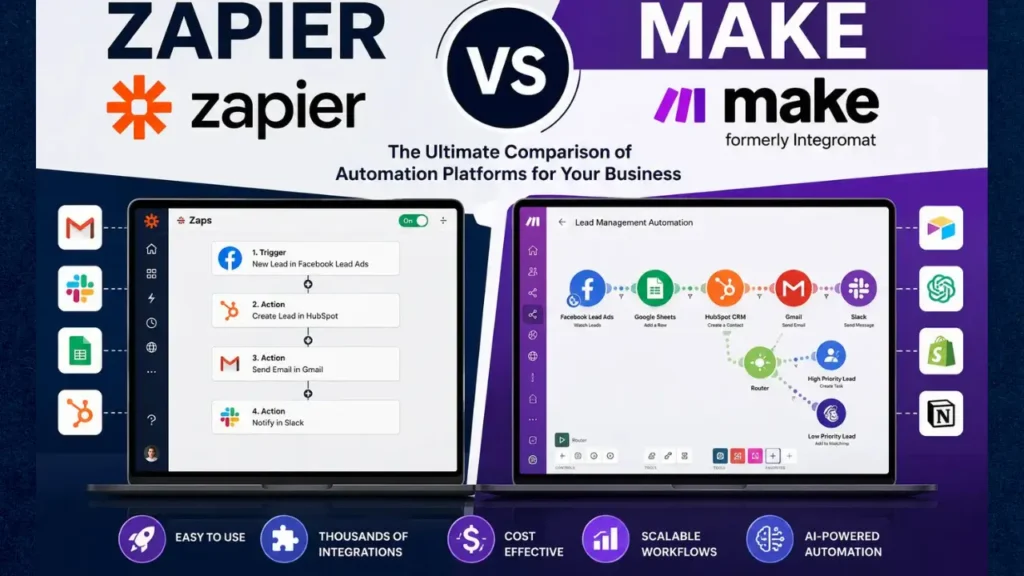
Unlike Zapier’s linear workflow model, Make provides a visual builder where users can see exactly how data flows through each automation.
A Make scenario can include:
- Multiple branches
- Advanced conditions
- Data transformations
- Error handling
- Loops
- Aggregators
This makes Make particularly attractive to power users, developers, and businesses with complex automation needs.
Zapier vs Make: Quick Overview
| Feature | Zapier | Make |
| Ease of Use | Excellent | Moderate |
| Visual Builder | Limited | Advanced |
| Learning Curve | Low | Medium |
| Integrations | 7,000+ | 2,000+ |
| Pricing | Higher | Lower |
| Advanced Logic | Basic | Excellent |
| Data Manipulation | Limited | Advanced |
| Error Handling | Basic | Advanced |
| Scalability | Good | Excellent |
| Best For | Beginners | Power Users |
Ease of Use: Which Platform Is Simpler?
Why Zapier Wins for Beginners
One of Zapier’s greatest strengths is its user-friendly interface.
Most users can build their first automation within minutes.
The platform guides users through:
- Selecting a trigger
- Choosing an action
- Testing the workflow
- Publishing the automation
Everything follows a logical step-by-step process.
For beginners, this simplicity is incredibly valuable.
Make Has a Steeper Learning Curve
Make’s visual canvas is powerful but can feel overwhelming at first.
Users must understand concepts such as:
- Data mapping
- Routers
- Iterators
- Aggregators
- Variables
Although the interface is visually appealing, it requires more time to master.
Winner: Zapier
Automation Capabilities
Zapier’s Approach
Zapier focuses on creating straightforward automations.
Typical examples include:
- Sending emails
- Updating spreadsheets
- Creating CRM records
- Posting on social media
While multi-step workflows are available, they can become difficult to manage when complexity increases.
Make’s Advanced Automation Engine
Make was built for complex workflows.
Examples include:
- Processing large datasets
- AI-driven content workflows
- Advanced eCommerce automation
- Dynamic branching logic
- Multi-system synchronization
Users can create sophisticated workflows that would require multiple Zaps inside Zapier.
Winner: Make
User Interface Comparison
Zapier Interface
Zapier uses a clean and minimal design.
Benefits include:
- Easy navigation
- Faster onboarding
- Less confusion
Drawbacks include:
- Limited workflow visualization
- Difficult troubleshooting for large automations
Make Interface
Make’s drag-and-drop visual builder provides a bird’s-eye view of every automation.
Benefits include:
- Complete visibility
- Easier debugging
- Better understanding of data flow
The downside is that beginners may initially find it intimidating.
Winner: Make
Integrations: Which Platform Connects More Apps?
Zapier’s Massive Integration Library
Zapier is the clear leader in integrations.
It supports more than 7,000 applications including:
- Gmail
- Slack
- Shopify
- HubSpot
- Salesforce
- Airtable
- OpenAI
For businesses that rely on many niche tools, Zapier often provides immediate compatibility.
Make’s Growing Ecosystem
Make supports over 2,000 integrations.
Although smaller, its library includes most major business tools.
Popular categories include:
- Marketing
- CRM
- eCommerce
- Productivity
- AI tools
Winner: Zapier
Pricing Comparison
Pricing is one of the biggest differences between Zapier and Make.
Zapier Pricing
Zapier’s pricing is generally considered expensive.
As workflows scale, task usage increases rapidly.
Businesses often find themselves upgrading plans sooner than expected.
Make Pricing
Make offers significantly better value.
Users receive more operations for lower monthly costs.
For startups and small businesses, this difference can be substantial.
Cost Efficiency Example
Suppose an automation runs 10,000 times monthly.
In many scenarios:
- Zapier may require a higher-tier plan
- Make can often handle the same workload at a lower cost
Winner: Make
Data Handling and Transformation
Zapier
Zapier provides basic data formatting tools.
Users can:
- Format dates
- Modify text
- Perform simple calculations
For most users, these tools are sufficient.
Make
Make excels at handling complex data.
Capabilities include:
- JSON parsing
- Advanced calculations
- Data aggregation
- Variable storage
- Array processing
This makes Make ideal for technical workflows.
Winner: Make
AI Automation Capabilities
Artificial intelligence has become a major factor in workflow automation.
Zapier and AI
Zapier has introduced numerous AI features including:
- AI-generated workflows
- AI-powered chatbots
- OpenAI integrations
The goal is to simplify automation creation.
Make and AI
Make offers powerful AI integrations as well.
Users can connect:
- OpenAI
- Claude
- Gemini
- Image generation tools
- Custom AI APIs
Because Make provides more flexibility, many advanced AI builders prefer it.
Winner: Make
Performance and Reliability
Both platforms maintain strong reputations for uptime and reliability.
Zapier
Advantages include:
- Stable infrastructure
- Excellent monitoring
- Reliable execution
Make
Advantages include:
- Detailed execution logs
- Better error management
- More transparency
For troubleshooting complex workflows, Make often has the advantage.
Winner: Make
Customer Support
Zapier Support
Zapier provides:
- Documentation
- Tutorials
- Community forums
- Email support
Its learning resources are among the best in the industry.
Make Support
Make also offers documentation and support, but its learning curve means users may spend more time consulting guides.
Winner: Zapier
Best Use Cases for Zapier
Zapier is ideal for:
Small Businesses
Companies seeking simple automation without technical expertise.
Marketing Teams
Automating lead capture, email marketing, and CRM updates.
Solopreneurs
Managing repetitive business processes quickly.
Content Creators
Automating social media publishing and content distribution.
Best Use Cases for Make
Make is ideal for:
Agencies
Managing large-scale client automations.
Developers
Creating advanced workflows with custom logic.
AI Businesses
Building sophisticated AI-powered systems.
eCommerce Stores
Managing inventory synchronization, order processing, and customer workflows.
Pros and Cons
Zapier Pros
- Extremely beginner-friendly
- Largest integration ecosystem
- Fast setup
- Excellent documentation
- Strong reliability
Zapier Cons
- Expensive at scale
- Limited workflow complexity
- Less visual control
Make Pros
- Powerful visual builder
- Affordable pricing
- Advanced logic capabilities
- Better data processing
- Excellent scalability
Make Cons
- Steeper learning curve
- Fewer integrations
- More complex setup
Zapier vs Make: Which Should You Choose?
The answer depends largely on your goals.
Choose Zapier if:
- You are new to automation
- You need quick setup
- You prioritize simplicity
- You want access to the largest app ecosystem
Choose Make if:
- You need advanced workflows
- You want better pricing
- You require complex logic
- You plan to scale automations significantly
For beginners, Zapier is often the easiest starting point.
For experienced users and growing businesses, Make frequently delivers more power and better long-term value.
Real-World Examples of Zapier vs Make
Understanding the differences between Zapier and Make becomes easier when looking at real-world automation scenarios. While both platforms can automate repetitive tasks, the way they approach complex workflows differs significantly.
Example 1: Lead Generation Automation
Imagine you run a digital marketing agency and generate leads through Facebook Lead Ads.
With Zapier, the workflow might look like this:
- New lead enters Facebook Lead Ads.
- Lead is added to HubSpot.
- Welcome email is sent through Mailchimp.
- The sales team receives a Slack notification.
This workflow is simple to create and requires very little technical knowledge.
With Make, the same workflow could include additional steps such as:
- Checking if the lead already exists in the CRM.
- Assigning leads to different sales representatives based on geographic location.
- Calculating lead scores.
- Creating custom reports.
- Sending personalized follow-up sequences.
For simple lead management, Zapier is excellent. For advanced lead routing and processing, Make provides much greater flexibility.
Example 2: eCommerce Automation
An online store may need to automate order management.
Zapier can:
- Add new orders to Google Sheets.
- Send confirmation emails.
- Notify fulfillment teams.
Make can go much further by:
- Updating inventory levels across multiple platforms.
- Creating shipping labels.
- Monitoring stock levels.
- Triggering supplier orders automatically.
- Generating accounting records.
This level of workflow sophistication makes Make particularly attractive for growing eCommerce businesses.
Example 3: AI Content Creation
AI-powered workflows have become increasingly popular.
A Zapier workflow might:
- Trigger when a new blog topic is added to Airtable.
- Generate content using ChatGPT.
- Save the draft to Google Docs.
A Make workflow could:
- Generate multiple content versions.
- Analyze SEO keywords.
- Create social media posts.
- Generate images through AI tools.
- Publish content automatically to WordPress.
- Send performance reports.
This is one reason many AI-focused businesses choose Make for their automation infrastructure.
Zapier vs Make for Small Businesses
Small businesses often have limited budgets and limited technical expertise. Choosing the right automation platform can significantly impact productivity and operational efficiency.
Why Small Businesses Choose Zapier
Many small business owners prefer Zapier because it is easy to understand and implement.
Benefits include:
- Minimal learning curve.
- Fast setup.
- Thousands of integrations.
- Reliable performance.
Business owners can begin automating repetitive tasks almost immediately without hiring technical specialists.
Why Some Small Businesses Prefer Make
Although Make requires more effort to learn, many small businesses eventually migrate because of cost savings and flexibility.
Advantages include:
- Lower operational costs.
- More automation possibilities.
- Better scalability.
- Greater customization.
For businesses expecting rapid growth, Make may offer a better long-term investment.
Zapier vs Make for Agencies
Marketing agencies, web development firms, and automation consultants often manage workflows for multiple clients simultaneously.
Zapier for Agencies
Zapier works well when agencies need to deploy automations quickly.
Benefits include:
- Faster client onboarding.
- Easier maintenance.
- Less training required for team members.
However, as client demands increase, costs can rise significantly.
Make for Agencies
Many automation agencies specialize in Make because it enables highly customized solutions.
Agency teams can create:
- Complex client dashboards.
- Multi-step marketing funnels.
- AI-driven customer service systems.
- Advanced reporting automations.
Because of its lower operational costs, agencies often achieve higher profit margins when using Make.
Security and Compliance Considerations
Security is an important factor when selecting any automation platform.
Both Zapier and Make offer enterprise-grade security features designed to protect business data.
Zapier Security Features
Zapier provides:
- Two-factor authentication.
- Data encryption.
- Secure data transmission.
- Enterprise security options.
Large organizations appreciate Zapier’s established reputation and mature infrastructure.
Make Security Features
Make also offers:
- Encryption protocols.
- Access controls.
- Secure API connections.
- Compliance-focused features.
For most small and medium-sized businesses, both platforms provide sufficient security.
The Future of Workflow Automation
Automation technology continues to evolve rapidly, especially with the growth of artificial intelligence.
Over the next few years, we can expect automation platforms to become more intelligent and autonomous.
Future trends include:
AI-Powered Workflow Creation
Instead of manually building workflows, users will increasingly describe what they want using natural language.
For example:
“Whenever a customer submits a form, qualify the lead, generate a personalized email, update my CRM, and notify my sales team.”
The automation platform will create the workflow automatically.
Predictive Automation
Future systems will analyze historical data and recommend workflow improvements.
This could include:
- Identifying bottlenecks.
- Predicting customer behavior.
- Suggesting new automation opportunities.
Deeper AI Integration
Both Zapier and Make are investing heavily in AI capabilities.
Businesses can expect:
- Smarter Automations.
- Better data analysis.
- Automated decision-making.
- AI-generated reports and content.
As AI becomes more advanced, automation platforms will become even more valuable for businesses seeking efficiency and competitive advantages.
Frequently Asked Questions About Zapier vs Make
Is Make better than Zapier?
For advanced automation and cost efficiency, Make is often considered better. For simplicity and ease of use, Zapier remains the leader.
Is Zapier worth the higher price?
Yes, especially for businesses that value simplicity, fast deployment, and broad integration support.
Can beginners use Make?
Yes, but expect a learning curve. The visual builder becomes easier with experience.
Which platform is better for AI automation?
Make generally offers more flexibility for advanced AI workflows, while Zapier focuses on ease of implementation.
Which platform is cheaper?
Make is usually more affordable and provides better value for users with high automation volumes.
Final Thoughts: Is Zapier or Make Better in 2026?
There is no universal winner in the Zapier vs Make comparison because the best platform depends entirely on your goals, technical skills, and business requirements.
Zapier excels in simplicity, user experience, and integration availability. It remains one of the best choices for beginners, entrepreneurs, and small teams that want reliable automation without complexity.
Make shines when flexibility, scalability, and advanced automation logic are priorities. Its visual workflow builder, lower pricing structure, and powerful data-processing capabilities make it a favorite among agencies, developers, and automation experts.
For many users, the journey begins with Zapier and eventually evolves into Make as automation needs become more sophisticated.
Regardless of which platform you choose, implementing automation is one of the smartest investments a business can make in 2026. By eliminating repetitive tasks, reducing human error, and improving efficiency, both Zapier and Make can help organizations save time, lower costs, and focus on strategic growth.